How to Register on the ICDL (Skillsbox) Website
The article below explains how to create your account on the ICDL Skillsbox website, which you will need to access practice tests and assessments.
Why registration is important:
- Skillsbox is the platform used for ICDL practice and assessments
- You must be registered before you can begin your ICDL practice and assessments
- Your results are tracked through your Skillsbox account
- Your examination transcripts will be on this account, even once you complete the course with eCollege and will always be accessible to you.
How to register:
* There is a very important registration code you need to enter below. Please ensure you do read these instructions.
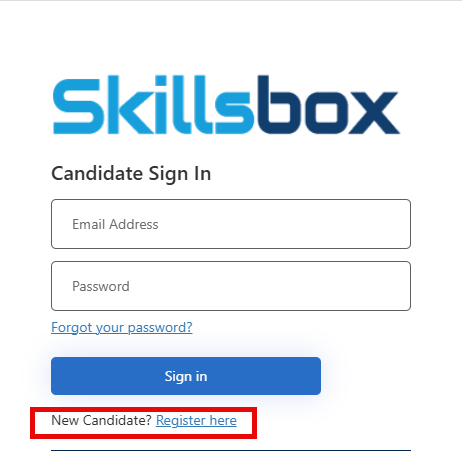
- Navigate to the ICDL Skillsbox website
- Click on New Candidate? Register Here
- Tick the CAPTCHA box
- Enter your email address on the next screen, then click Send Verification Code to receive an email. Keep this webpage open, you will need to get the code from your email and come back to this page to enter the code.
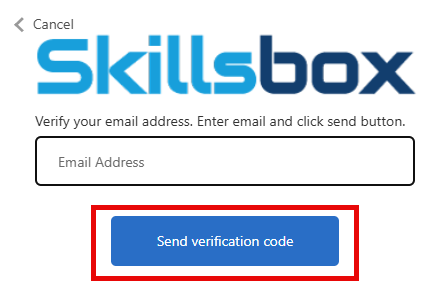
- Navigate to your email and find the message that contains the code. If you cannot see the email, please check your Spam/Junk folder to see if it was delivered there.
- Find the code and go back to the registration screen
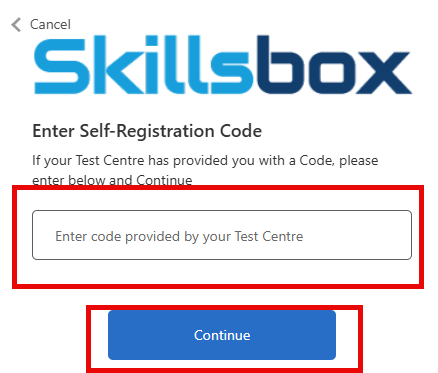
- You are now asked to enter the Self Registration Code (this will align you with our ICDL centre). The code to use is 5c-P5aezdL
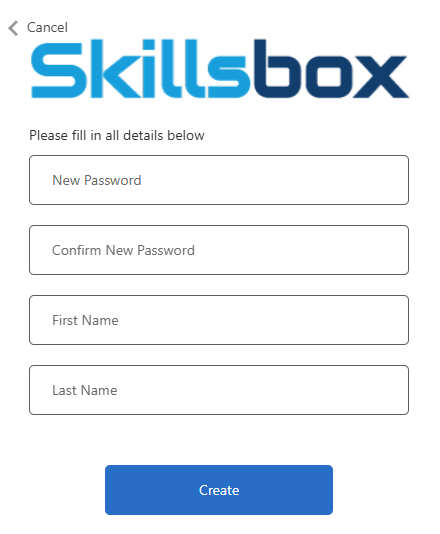
- You will not be asked to enter a password and your name. Please enter a secure password that you will remember. and click Create.
- You will not be asked to log in; please do so.
- Once logged in, you will be asked to read and agree to the Terms of Use, scroll down to read, and then select Agree.
- Once this is completed, please then submit the questionnaire to request your Diagnostic on the eCollege website.
Was this article helpful?
That’s Great!
Thank you for your feedback
Sorry! We couldn't be helpful
Thank you for your feedback
Feedback sent
We appreciate your effort and will try to fix the article