What this page is for
This article explains how to register for the Wiley/Sybex Learning Platform and access the practice tests and study resources included with your course.
It also explains how to locate the correct eBook, redeem your Wiley/Sybex access, and resolve common registration issues.
If you experience difficulties during registration, please review the troubleshooting section before contacting support.
On this page
- How to Register for the Wiley/Sybex Learning Platform
How to Register for the Wiley/Sybex Learning Platform
Overview
Many courses include access to the Wiley/Sybex Learning Platform, which provides additional study resources linked to your recommended course eBook.
Resources may include:
- Assessment tests
- End of chapter questions
- Practice exams and mock tests
- Flashcards
- Glossaries and reference materials
- Progress tracking and study analytics
The eBook required for registration is provided within your course under Course Resources and Recommended Course eBooks.
Before You Begin
Important
Before registering, make a note of the exact eBook title and edition shown in your course.
Selecting the wrong book or edition may prevent your Wiley/Sybex access from being activated correctly.
Example:
CompTIA A+ Complete Review Guide: Core 1 Exam 220-1201 and Core 2 Exam 220-1202, 6th Edition
Always choose the exact same title and edition during registration.
Step 1: Open the Registration Page
Open the Wiley/Sybex registration page:
Open Wiley/Sybex Registration Page
Complete the registration form and create your Wiley account.
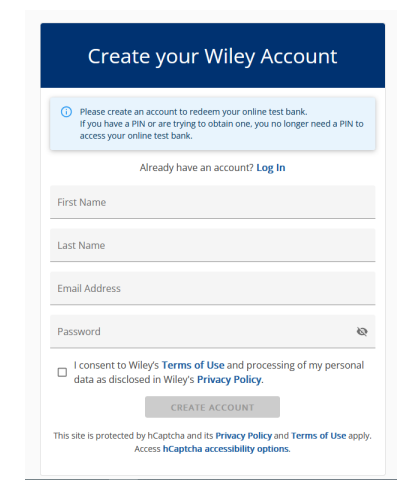
Step 2: Confirm Your Email Address
After creating your account, Wiley will send a confirmation email.
Open the email and select Log in to complete registration.
If you cannot find the email, check your spam, junk, or promotions folder.
Step 3: Log In to Wiley
Once your email address has been confirmed, log in using the account credentials you created during registration.
You may wish to:
- Select Remember me
- Save the Wiley website in your browser bookmarks
- Use the same email address linked to your learning account
Step 4: Redeem the Test Bank
After logging in, you will be taken to the Wiley platform.
Select the REDEEM TEST BANK option to begin activating your resources.
Step 5: Select Your eBook
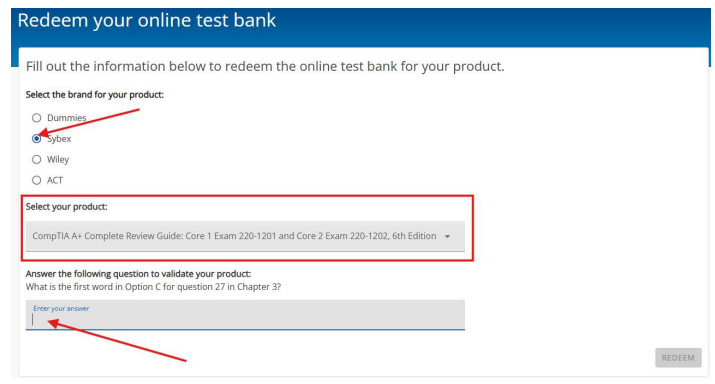
On the redemption screen:
- Select the Sybex option.
- Open the Select Your Product dropdown menu.
- Choose the eBook that exactly matches the title and edition shown in your course.
- Answer the security question using information found in your eBook.
- Complete the redemption process.
Tip
If multiple versions of a book are listed, carefully check the edition number before making a selection.
Step 6: Access the Test Bank
After successfully answering the security question, the Wiley/Sybex content will be activated.
Select GO TO TEST BANK to access the available learning materials.
Step 7: Use the Available Resources
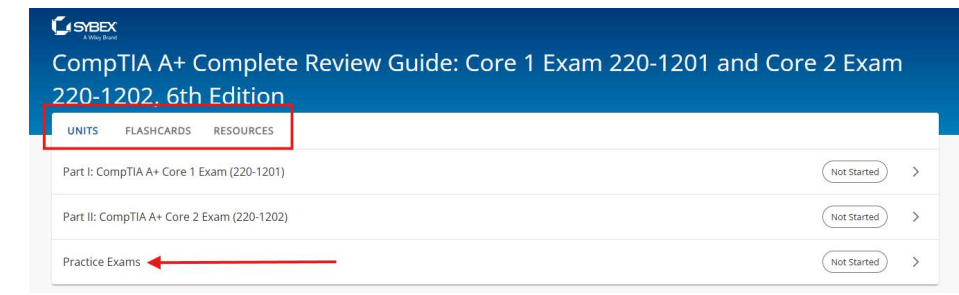
Units
The Units section may contain:
- Assessment tests
- Chapter review questions
- Practice exams
- Exam preparation activities
Flashcards
The Flashcards section provides interactive revision cards covering key exam topics and concepts.
Resources
The Resources section typically includes glossaries and additional learning materials relevant to the certification syllabus.
Troubleshooting
I cannot find my book in Wiley
Check the Recommended Course eBooks section in your course and confirm that you are selecting the exact same title and edition in Wiley.
I selected the wrong book
Return to the product selection page and choose the correct title and edition that matches your course resources.
I cannot answer the security question
The answer must be located within the relevant section of your eBook. Open the eBook and navigate to the specific chapter or page referenced by the question.
I registered successfully, but cannot see the practice tests
Ensure you have completed the redemption process and selected GO TO TEST BANK. The practice materials are available within the Wiley/Sybex add on content.
I did not receive the confirmation email
Check your spam or junk folder. If the email is still missing, try registering again using the same email address or contact support.
Need Help?
If you have technical issues or have questions, you can contact Support through the support portal.
Version Control
Current version: v1.0
Last updated: 20 July 2026
Owner: Cenit College
This article reflects current processes. In line with Cenit College policy, processes may be amended where required to meet operational, regulatory, or awarding body requirements.
Was this article helpful?
That’s Great!
Thank you for your feedback
Sorry! We couldn't be helpful
Thank you for your feedback
Feedback sent
We appreciate your effort and will try to fix the article