What this page is for
This article explains how to prepare for, book, and complete the Certified Digital Marketing Professional (CDMP) exam.
It also explains how to access your results, official certificate, and complimentary one-year DMI membership and library subscription. [DMI responses | Word]
If you need help with exam registration, account activation, exam submission, or technical issues, please contact the Cenit College Support Team.
On this page
Before You Can Book Your Exam
Before booking your exam, you will need to ensure that:
- You have completed all required course modules. You cannot book your exam until this is all completed.
- You have completed the Exam Registration form on your eCollege dashboard.
- You have received and activated your DMI account.
- You have reviewed the DMI Exam Instructions Guide.
Exam registration
Once you complete the Exam Registration form on the eCollege course dashboard, your registration details will be sent to the Digital Marketing Institute (DMI).
DMI will then send you an email containing instructions for activating your DMI profile and accessing exam information..
Please allow at least 48 business hours for DMI to process your registration and activate your account.
If you have not received your activation email after this period, please contact the Cenit College Support Team.
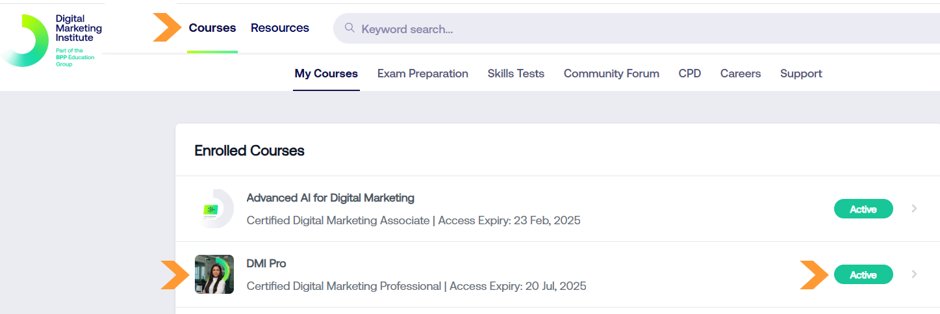
Once logged in to MyDMI:
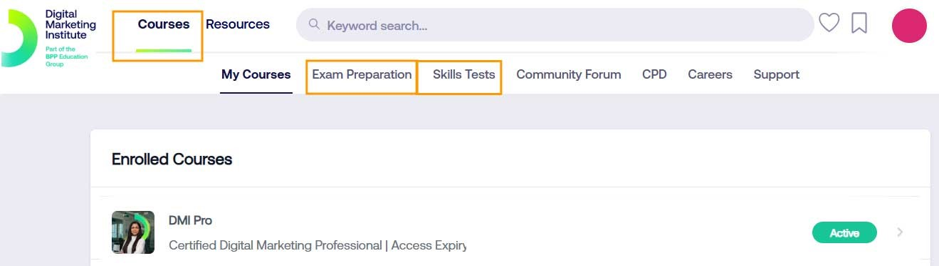
- Select Courses from the main menu.
- Open your active course.
- Access the Exam Information section.
All exam-related information is managed through your DMI account.
Important to know
You book your exam for a specific date, not a specific time.
You may start the exam at any point during your chosen day, but once started, the exam must be completed within the permitted time limit
Booking your exam
- Log in to your DMI profile.
- Open My Courses.
- Select your active course.
- Access the exam booking area.
- Choose a date that suits you.
There are no fixed exam time slots. You may start the exam at any time on your booked day.
After booking your exam:
- Return to your eCollege Course dashboard.
- Open the Confirm Your Exam Booking section.
- Enter the exam date you selected in DMI.
DMI Instructions Guide
Before taking your exam, please review the DMI Exam Instructions Guide in full. - Linked here
Exam Booking → Exam Instruction Guide
The guide contains important information relating to:
- Exam requirements
- System requirements
- Exam procedures
- Technical guidance
Taking your exam
On the day of your exam, you may begin at any time.
Before starting, ensure:
- You have a reliable internet connection.
- You are in a quiet environment.
- You have reviewed the exam instructions thoroughly.
Once started, the exam must be completed within the allowed time limit provided by DMI.
Provisional results score
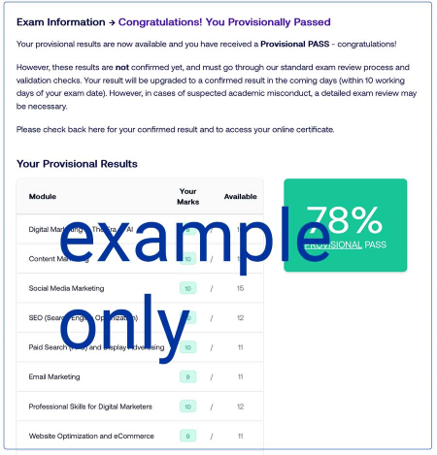
Your provisional result will be available within your MyDMI profile shortly after completing the exam.
Please note that this score remains subject to DMI review and validation.
To locate your score:
- Log in to MyDMI.
- Select Courses.
- Open your active course.
- Locate your provisional results area.
Submitting Your Exam Result
To submit your result to Cenit College:
- Take a screenshot of your provisional score.
- Return to your eCollege dashboard.
- Navigate to Submit Your Exam Result.
- Upload your screenshot.
Videos
Click play below to view How to Book Your Exam and Install the Inspera Integrity Browser
Click play below to view How to Take Your Exam with Inspera Integrity Browser
Revision
Please allow enough time to revise before booking your exam. You should use all available Cenit College and DMI resources.
Cenit College revision resources
- Course Dashboard revision quiz. This contains 200 questions and presents a random 120 on each attempt.
- Course Resources, Course Downloads, Module Content, Study Notes.
- There is one study note per module covering all module content. These are useful for quick searching during revision.
DMI revision resources
Log in to your DMI profile to access the following.
- Exam Preparation area with all course quizzes in one place.
- Skills Test consisting of forty-eight questions.

Accessing your official certificate
Within one month of completing your exam, you will receive an email from Accredible on behalf of DMI. Accredible is the digital credential platform used to issue your official certification.
Using Accredible, you can:
- Download your official certificate in PDF format.
- Share your certification directly to LinkedIn.
- Add your certificate details to your CV or professional profile.
Congratulations on achieving your certification.
One year free DMI library subscription
As part of your certification journey, you will receive a complimentary one-year DMI membership and library subscription. The subscription begins when your DMI exam registration is activated.
Membership benefits include access to:
- Webinars
- Podcasts
- E-books
- Industry resources
- Professional development content
- Selected short courses
After the complimentary year ends, membership can be renewed directly with DMI if desired.
Exam Repeats
If you do not achieve a passing score on your first attempt, you may be eligible to resit the exam.
To request a repeat:
- Submit your provisional result through the eCollege dashboard.
- Await instructions from the Cenit College Support Team.
Please do not purchase a replacement exam directly from DMI
Technical Queries
Webcams
- A webcam is required.
- Inspera supports both internal and external webcams, and the exam system will be able to detect it. As long as the external camera is recognised by the laptop's operating system as a functioning video input device, it will work with Inspera. During the initial system and compatibility checks right before the exam starts, the student will simply need to select the external camera from the available device dropdown if it does not default to it automatically.
Need Help?
If you experience technical issues or require assistance at any stage of the process, please contact the Cenit College Support Team through the Support Portal or email: cenitsupport@cenitcollege.ie
Version Control
Current version: v1.1
Last updated: 07 July 2026
Owner: Cenit College
This article reflects current processes. In line with Cenit College policy, processes may be amended where required to meet operational, regulatory, or awarding body requirements.
Was this article helpful?
That’s Great!
Thank you for your feedback
Sorry! We couldn't be helpful
Thank you for your feedback
Feedback sent
We appreciate your effort and will try to fix the article