- What this page is for
This article explains the Microsoft Office Specialist certification pathway and how learners can progress from individual exams to the Expert level.
It outlines each step, the badges and certifications available, and how they support your professional development.
If you need help with your course or exams, please contact the support team.
On this page
MOS Certification Pathway
Progress through your MOS journey and earn recognised certifications and digital badges at each stage.
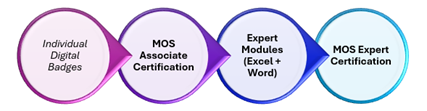
Step 1: Individual MOS Modules
Earn a Digital Badge for EACH exam
- Excel Associate → ? Excel Badge
- Word Associate → ? Word Badge
- PowerPoint Associate → ? PowerPoint Badge
Step 2 MOS Associate Certification
Complete all three modules
- Excel + Word + PowerPoint
You achieve
- MOS Associate Certificate
- MOS Associate Digital Badge
Demonstrates full competency across Microsoft Office tools
Step 3 Expert Progression
After achieving MOS Associate, complete
- Excel Expert → ? Expert badge
- Word Expert → ? Expert badge
Final Goal MOS Expert Certification
You achieve
- Microsoft Office Specialist Expert Certification
- Expert Digital Badges
Demonstrates advanced workplace ready expertise
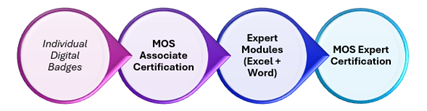
Visual Pathway
✅ Reminder
Every exam you pass is a recognised achievement.
Each badge is a visible milestone in your professional development.
Need Help?
If you have technical issues or have questions, you can contact Support through the support portal.
Version Control
Current version: v1.0
Last updated: 14 July 2026
Owner: Cenit College
This article reflects current processes. In line with Cenit College policy, processes may be amended where required to meet operational, regulatory, or awarding body requirements.
Was this article helpful?
That’s Great!
Thank you for your feedback
Sorry! We couldn't be helpful
Thank you for your feedback
Feedback sent
We appreciate your effort and will try to fix the article